If you've recently started working with a digital marketing agency, you may feel overwhelmed with the requests to access your social media platforms. We promise we are asking out of necessity! Here's a quick overview of why it's so important to get credentials to your digital agency.

No one really warns you about what's involved when you sign on with a digital marketing agency. Of course, each agency will have different requirements in terms of what they need, but you can always expect requests to access your social media accounts, website, online store, etc. We physically cannot start work on your account without access to edit your pages. We aren't trying to invade your privacy, and we won't change anything that will mess up your account. It can be hard to understand why we need access, so we want to give you a general overview of each platform to help you see what goes on behind the scenes.
If you're joining a digital marketing agency, you likely already have a Facebook page for your business. We don't want you to lose the posts, interactions, and followers that you already have, so we use the existing account and build off of it. That being said, we require manager access of your account. Only admins with this level of access can work on the page in the manner required. Once we're managers of the page we can edit the photos on your page, change your bio, update your hours and about information, post on your behalf, comment as the business, and so much more! If you're worried about giving up the reins, you can take a breath; we don't replace you as an admin, we join you! You still have total control over your account if you need to make changes. We never change anything important like business phone number or the main emails. We will add your page to our Business Manager Account so we can keep an eye on everything for you!
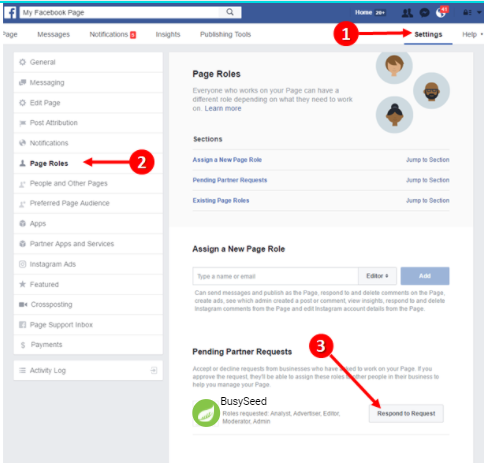
Here's what to do:
- We will send you a request to manage your business's page
- To accept, go to your page and click on "Settings" up in the right corner
- Select "Page Roles" from the left-hand column on the screen
- You should see a "Pending Partner Request". Click on that and approve the request!
- You'll have to re-enter your password to confirm the approval
- You're all set!
Facebook Ads
Related to your Facebook page, we need access to your Facebook Ads Account (if you have one already). Just about any digital marketing agency will have an Ads Manager account for Facebook. As with the page, we need permission to go into your ads account and make changes. If social media advertising is on your package, you should expect a request for access. This is one of the things we want ASAP so that we can launch your campaigns and get you results. Without access, we can't even build out the campaigns for your approval. The faster we are let into your ads account, the faster we can get your campaigns live and running!
The process of granting us the access required for Facebook Ads is very simple!
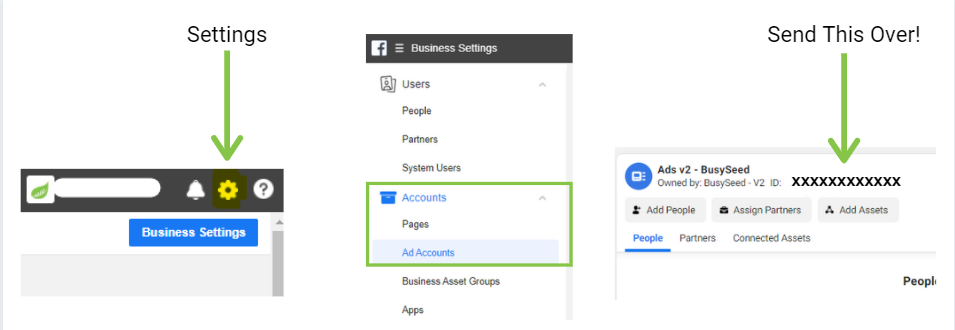
- Go to your Business Manager on Facebook
- Click the cog wheel in the upper right corner and go to Business Settings
- Once under Settings, find "Accounts" in the column on the left side of the page
- Click "Accounts" then click "Ad Accounts"
- Select the ad account you want to share with your digital marketing agency
- Send over the Account ID located under the Account Name
- We will then send over a request to join the account. Accept us and you're all set!
Instagram is quite different than Facebook because we don't actually require any special access for it. If a digital marketing agency will be posting to Instagram for you, all they need is your login information. Send them over your username and password. More often than not, 2-factor verification is on so you will get a code sent to your phone acknowledging that a new device is trying to log into your account. Other than the credentials there isn't much to do here on your part. Thanks Instagram!
Steps to get us in:
- Send us your Username and Password for your business Instagram account
- You can expect to receive a verification code to your affiliated phone
- Your Client Success Manager will message you asking for the verification code. Just send it over and you should be all set!
Google Ads
If you have Google Ads on your package, your digital agency will need access to that as well (if you already have an account). Like with Facebook Ads, we cannot build or run any campaign without access to your account. We always prefer to use an existing account when we can to keep all data, keywords, optimized ads, etc. Google makes granting access to your agency extremely easy! There are only a few steps and then you're good to go! You can still go in an check on the ads account, but your agency can be in charge of running everything.
To grant us access:
- Log in to your Google Ads account
- Find the 10-digit account ID at the top next to the name of the account.
- Copy that ID and send it to your agency via email.
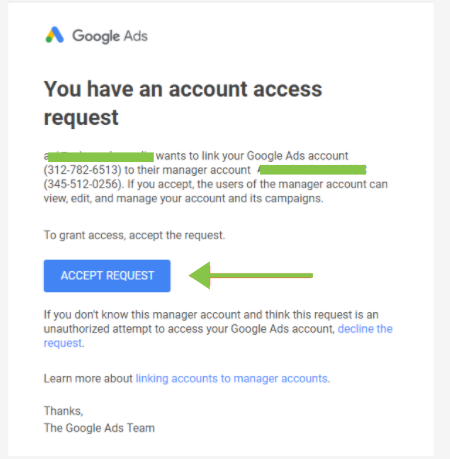
- We will then send you an Access Request
- You'll get an email with an "Accept Request" button that will bring you to the "Managers" tab in Google Ads.
- Hit "Accept" and BOOM that's it!
General Tips and Things To Remember
- Digital marketing agencies will typically need the highest level of access across platforms to be able to get everything done as promised.
- No reputable agency will do anything malicious to your account. We won't try to take control from you at all.
- Although you will still have full access, please talk to your agency before you make any changes. Keep communication open and you shouldn't run into any problems.
- If you change your password for any business account, please let your digital agency know so we can update our records. Also note that password changes might require another verification code from you.
- The faster we get access, the faster we can get to work. If you're delaying the process because you're stuck, reach out to your account manager! They can walk you through the steps over the phone so that your work is done and out of the way.
- If you do not have an account, we will make one for you. We will give you access to the new account so you can see what's happening.
- If you are worried about letting the agency access your account in the event you decide to part ways, we assure you that the top digital marketing agencies will not give you any trouble once your contract expires. We will not hold your account hostage, and it will be yours to take with you.
We hope these instructions were helpful. If you're not constantly working with business accounts, it can be confusing to navigate them. Your digital agency should be able to walk you through anything you still have a hard time with. Investing in managed social media and social media advertising is a wonderful business move. It will free you up to handle other aspects of your company, and it puts marketing in the hands of experts in the field. We'll get you results on any platform thanks to our years of experience! If you're ready to step into the world of managed social media, call us at (888) 353-1484.